

























The artificial neural network prediction tool
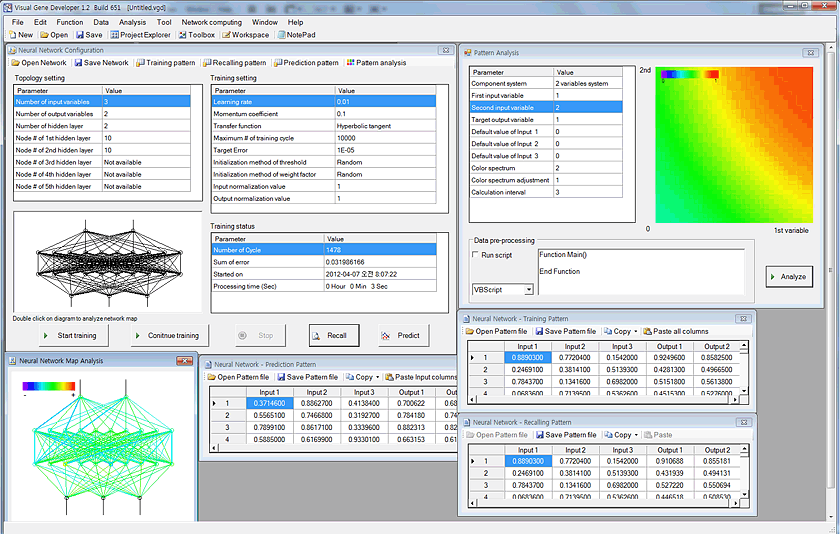
For data regression and prediction, Visual Gene Developer includes an artificial neural network toolbox. You can easily load data sets to spreadsheet windows and then correlate input parameters to output variables (=regression or learning) on the main configuration window. Because the software provides a specialized class whose name is 'NeuralNet', users can directly access to the class to make use of neural network prediction toolbox when they develop new modules. A user can use maximum 5 instances of NeuralNet including 'NeuralNet', 'NeuralNet2', 'NeuralNet3', 'NeuralNet4', and 'NeuralNet5'.
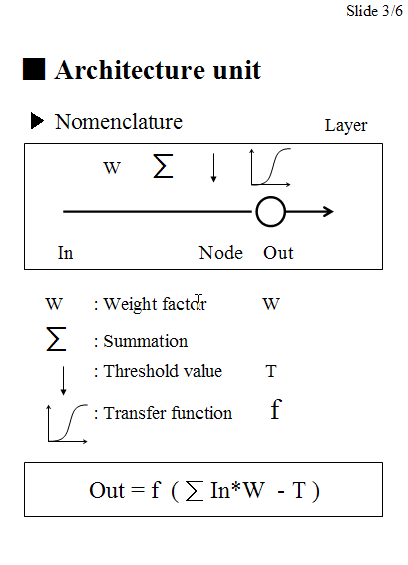
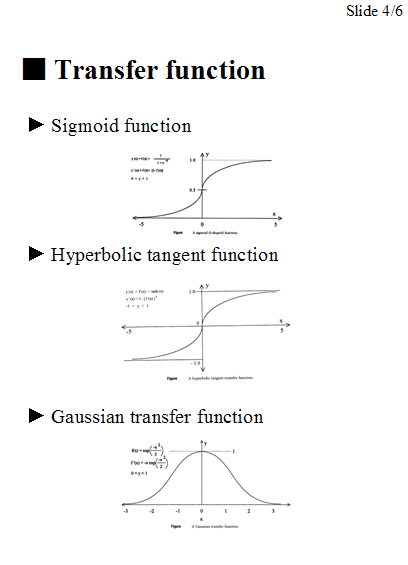
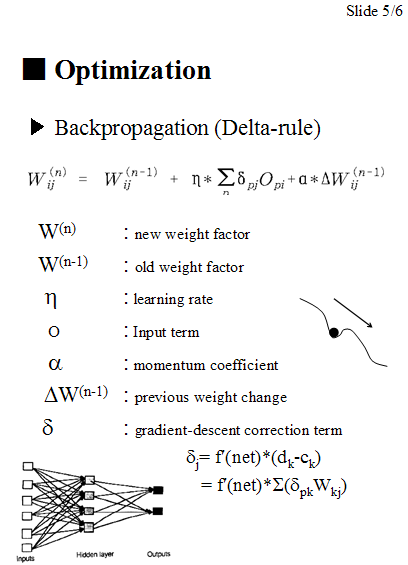
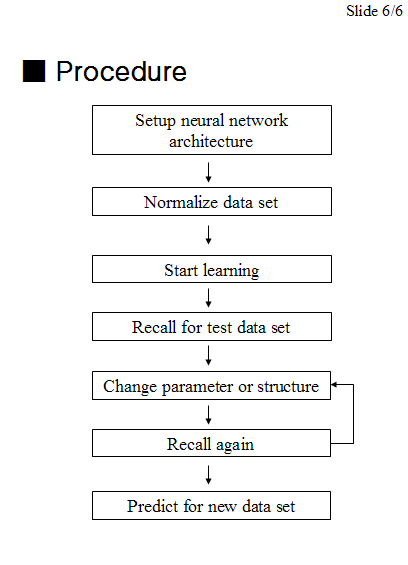
We used a typical feed-forward neural network with a standard backpropagation learning algorithm to train networks and provides several different transfer functions. Without using gene design or optimization, our neural network package works perfectly independently even though all menus are still in the software environment. In this section, we shortly describe the artificial neural networks and then demonstrate how to use neural network toolbox and the class.
New update: if you are a programmer and want to use trained neural network files in your own programs, check NeuralNet.java.
Visual Gene Developer is a free software for artificial neural network prediction for general purposes!!!
Check built-in analysis tools: data normalization, pattern analysis, network map analysis, regression analysis, programming function
o Artificial neural network
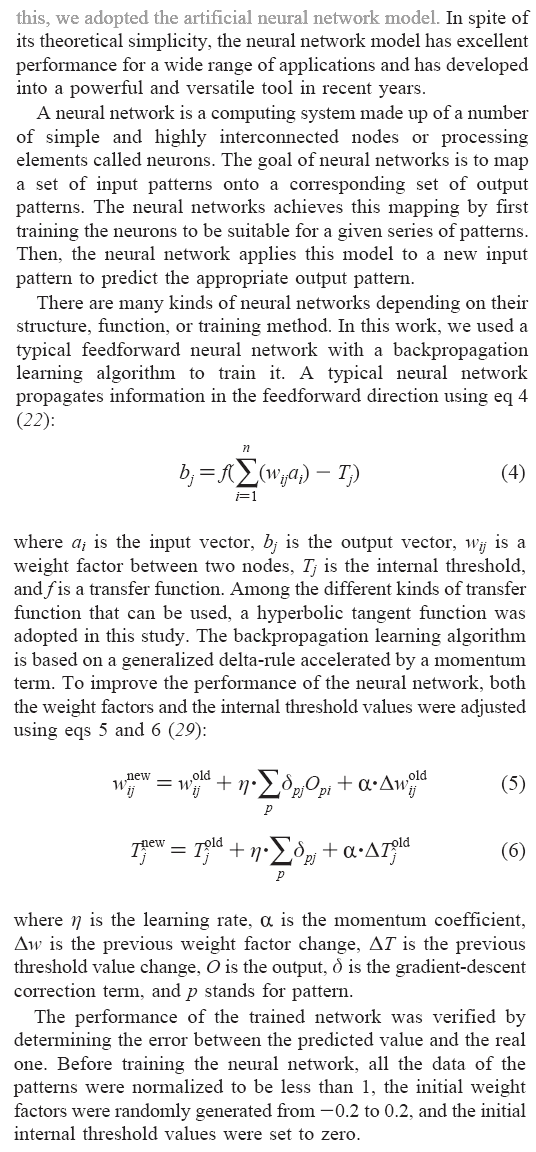
From Sang-Kyu Jung & Sun Bok Lee, Biotechnology Progress, 2006.
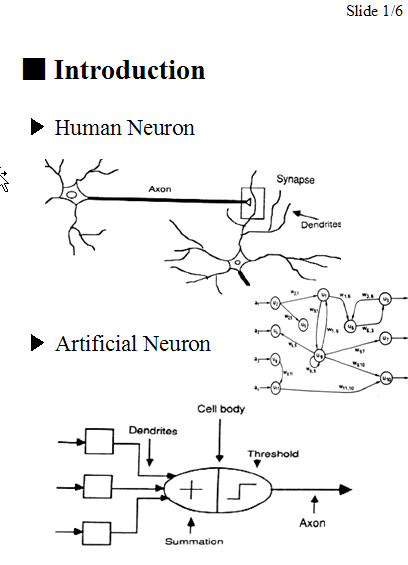
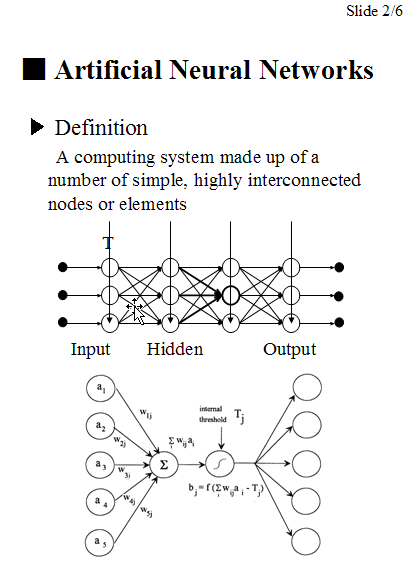
Simple slides here.
o How to use artificial neural network toolbox
Step 1: Prepare data set
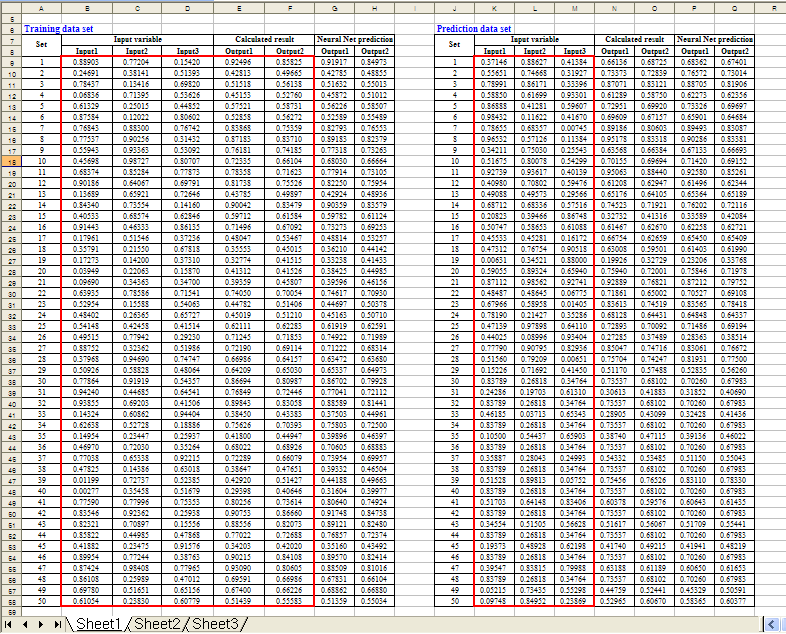
Here is a simple example. Using Microsoft Excel, the following table was generated. Click here to download 'Sample SinCos.xls'
In the 'Equation', 'Calculated Output1' and 'Calculated Output2' were divided by 2 or 3 to normalize data. Keep in mind that all data values should be less than 1 and must be normalized if they are bigger than 1. If the numbers are higher than 1 it may mean that they are out of range for the neural network prediction.
New update! A new function for data normalization has been implemented!
| Equation |
Input1=Rand()
'random number between 0 and 1 Input2=Rand() 'random number between 0 and 1 Input3=Rand() 'random number between 0 and 1 Calculated Output1=(Input1+Input2^Input3)/2 Calculated Output2=(Input1+Sin(Input2)+Cos(Input3))/3 |
||||||
Step 2: Configure a neural network
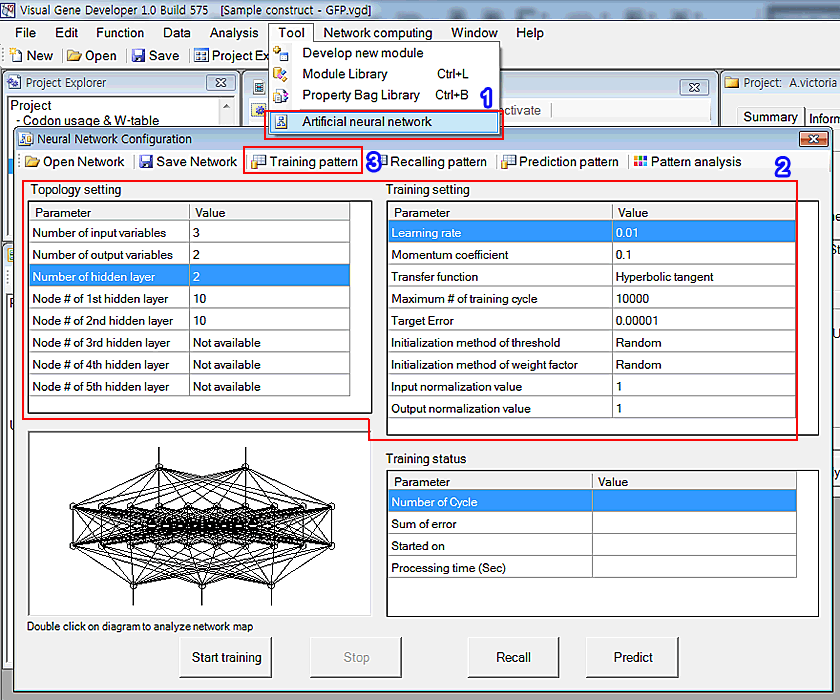
1. Click the 'Artificial neural network' in the 'Tool' menu
2. You can see the window titled 'Neural Network Configuration'. Adjust parameters as shown in the 'Topology setting' and 'Training setting'
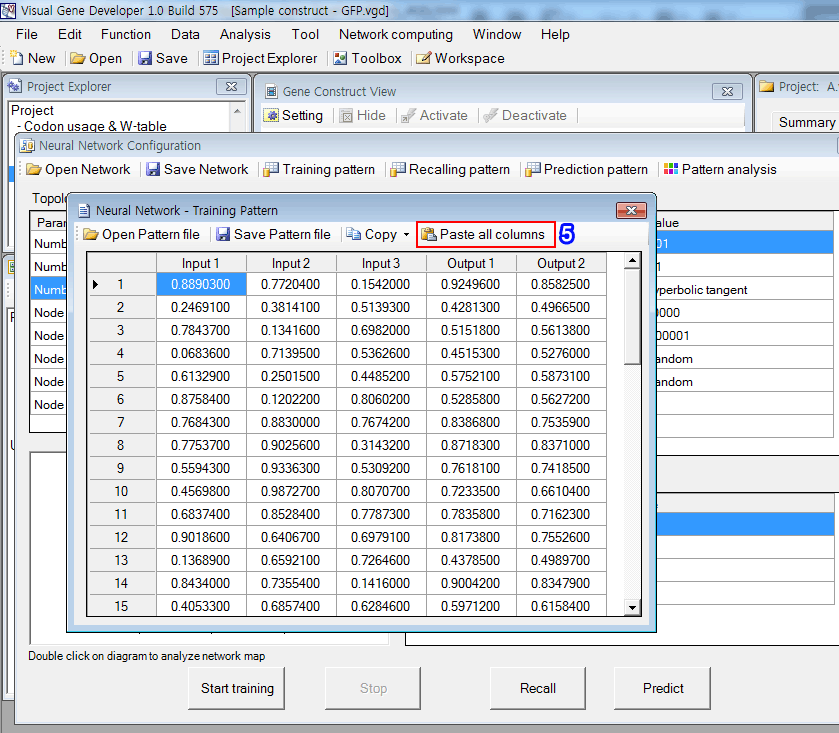
3. First, click on the 'Training pattern' button in order to set up the training data set. Immediately, you can see a new pop-up window. But it doesn't include any data initially.
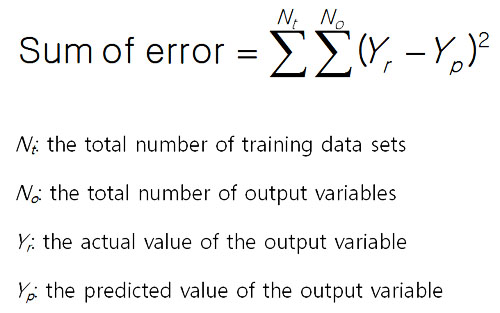
The sum of error is defined by the following equation.
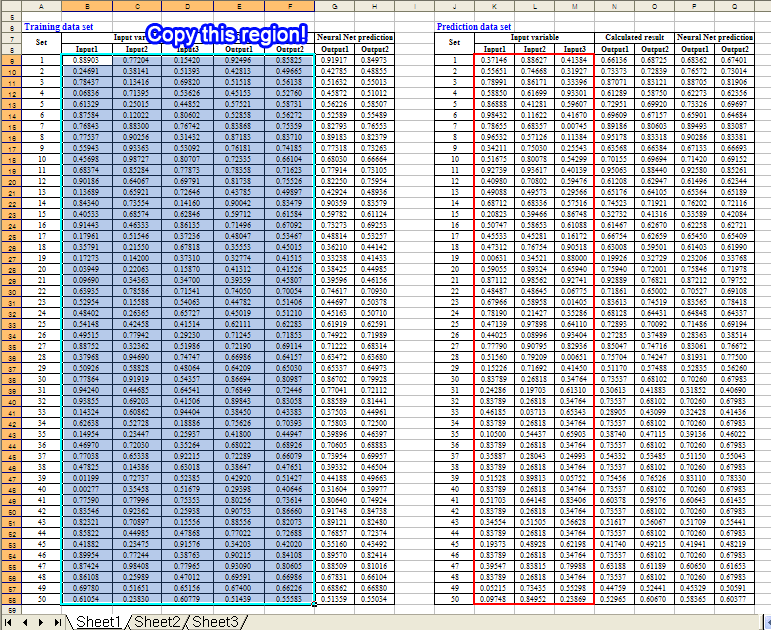
4. Copy the following region of the training data set in the Excel document
5. Click on the 'Paste all columns' button in the 'Neural Network - Training Pattern' window. It retrieves text data from the clipboard and pastes it to the table as shown in the figure.
Step 3: Start learning process (=data regression)
1. Click on the 'Start training' button. It took about 70 seconds to repeats 30,000 cycles.
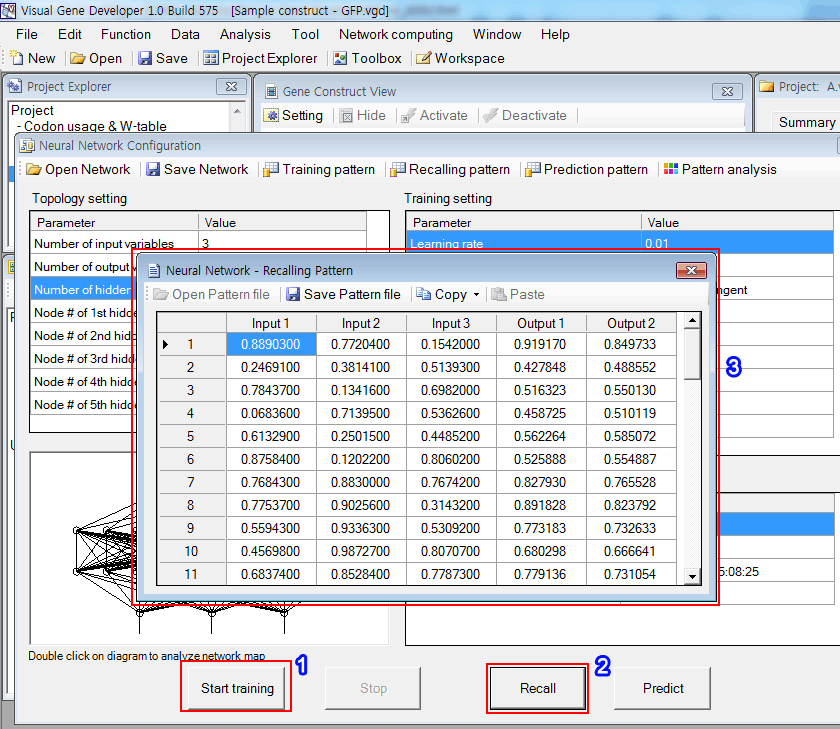
2. Click on the 'Recall' button.
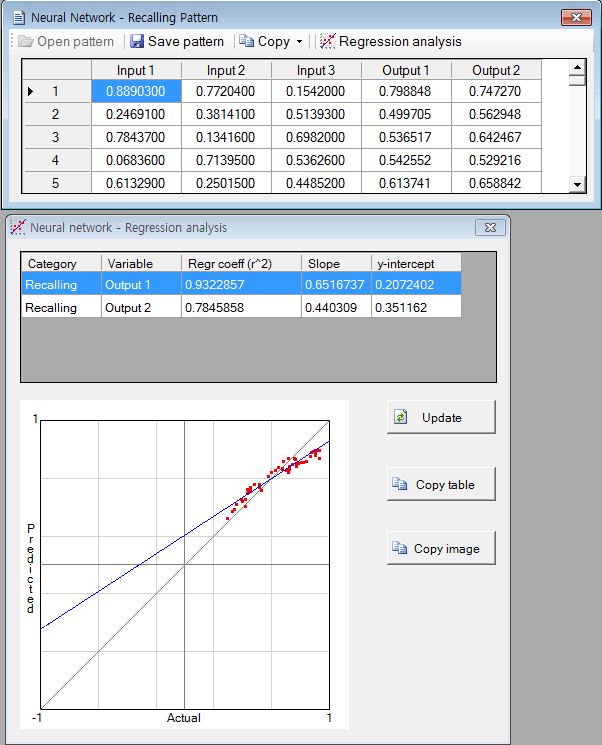
3. The software filled the empty columns (Outpu1 and Output2) with numbers and you can check the predicted values. The 'Copy' button is available.
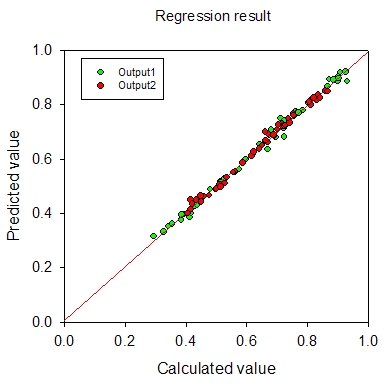
4. The regression result is shown in the below figure. It looks quite good.
Step 4: Predict new data set
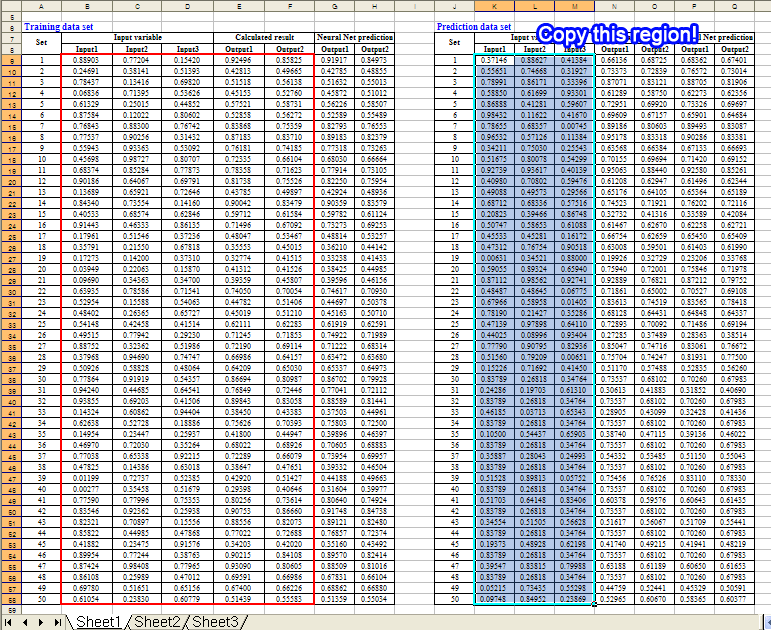
1. Copy the following region of the training data set in the Excel document.
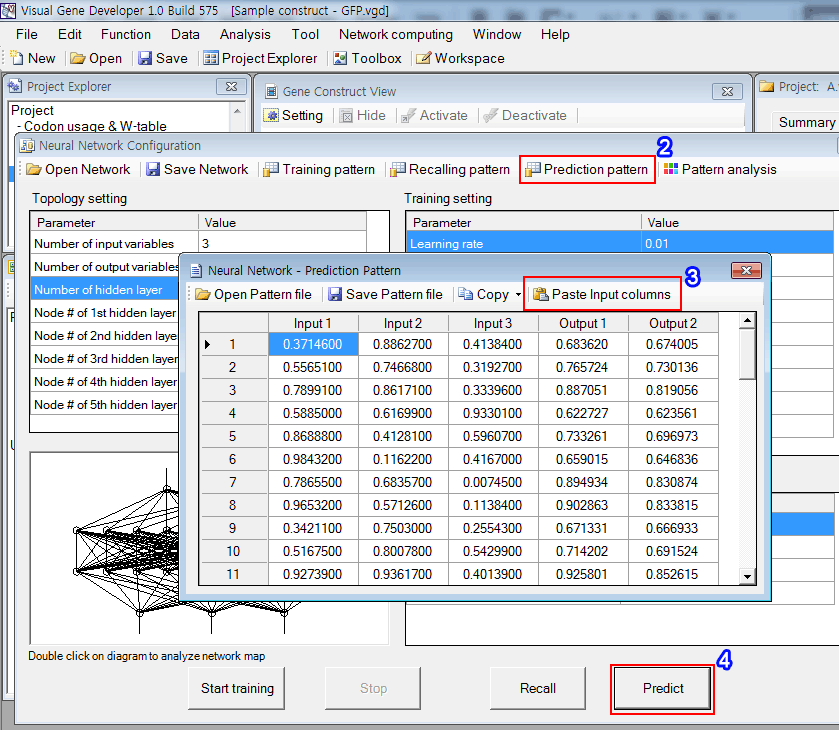
2. Click on the 'Prediction pattern' button in the 'Neural Network Configuration' window
3. Click on the 'Paste Input columns' button to paste data of clipboard to the table
4. Click on the 'Predict' button. It will complete the table as shown in the figure. You can check the predicted values.
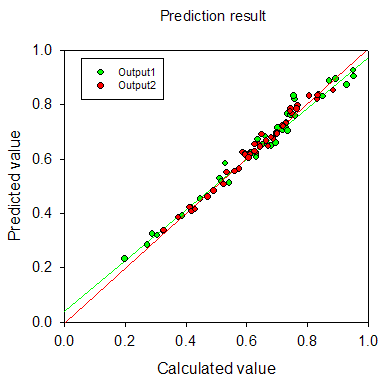
5. The result is shown in the figure. It really works well.
New!! Watch YouTube video tutorial
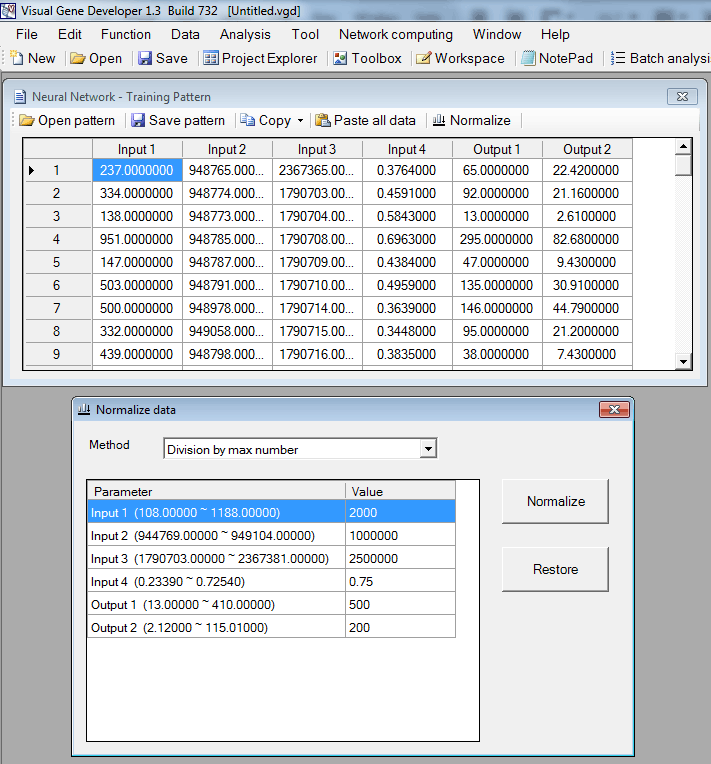
- Click on the 'Normalize' button to show the pop-up window.
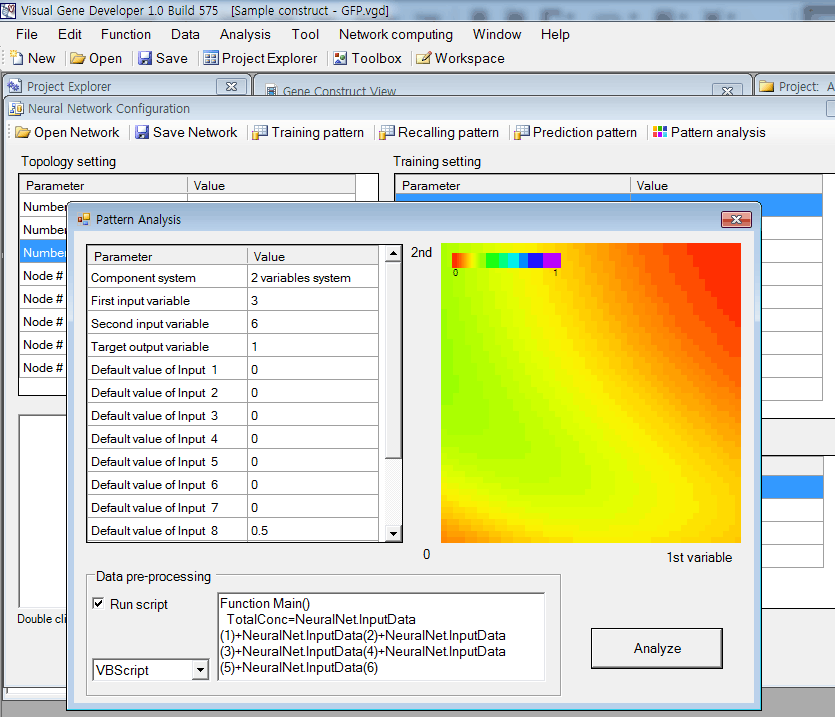
In the case of multiple input variable systems, Visual Gene Developer provides a useful function to test 2 or 3 input variables as a nice plot.
2-D plot for two-variable system
Ternary plot for three input variable system
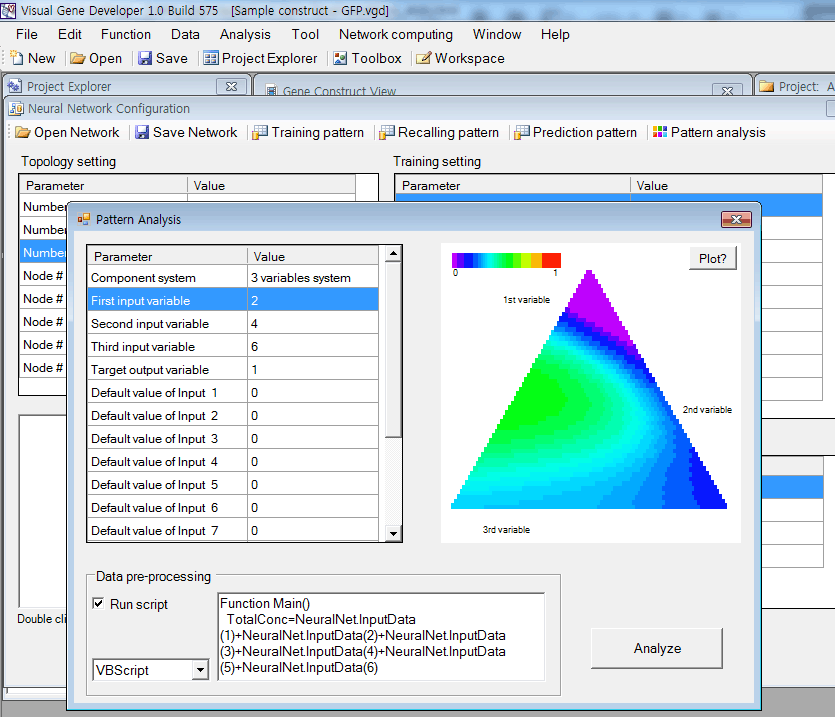
'Data pre-processing' is performed if 'Run script' is checked.
Internally, Visual Gene Developer assigns initial values of all input variables and then executes the script code written in 'Data pre-processing'.
This function is useful when a certain input variable depends on other variables. For example, input 3 is the sum of input 1 and input 2.
To adjust the value of input 3, you can write code like,
|
Function Main() |
Visual Gene Developer provides a graphical visualization of a trained network for a user. You can check the color and width of a line or circle.
Lines represent weight factors and circles (node) mean threshold values.
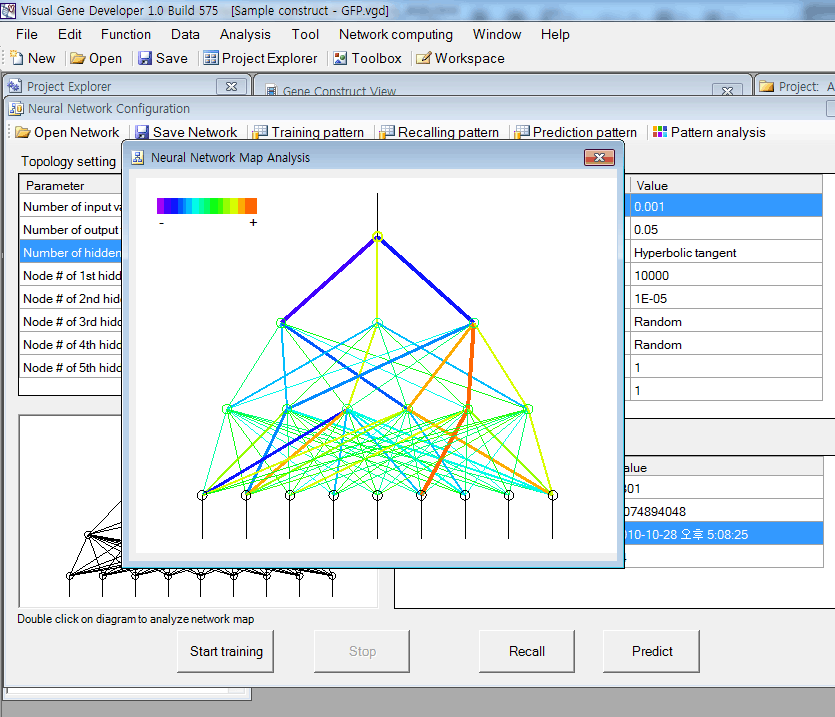
Just double-click on a diagram in the 'Neural Network Configuration' window.
In the diagram, the red color corresponds to a high positive number and violet color means a high negative number. Line width is proportional to the absolute number of weight factor or threshold value.
o Regression analysis New update!
o More information about Neural network data format
You can save the data set table as a standard comma delimited text file. Our neural network (trained) data file is also easily accessible because it has a standard text file format. You can open sample files and check the content.
o How to use 'NeuralNet' class
Although Visual Gene Developer has a user-friendly neural network toolbox, a user may prefer using the 'NeuralNet' class to make customized analysis module. A user can use maximum 5 instances of NeuralNet including 'NeuralNet', 'NeuralNet2', 'NeuralNet3', 'NeuralNet4', and 'NeuralNet5'.
Example
1. Click on the 'Module Library' in the 'Tool' menu
2. Choose the 'Sample NeuralNet' item in the 'Module Library' window
3. Click on the 'Edit Module' button in the 'Module Library' window
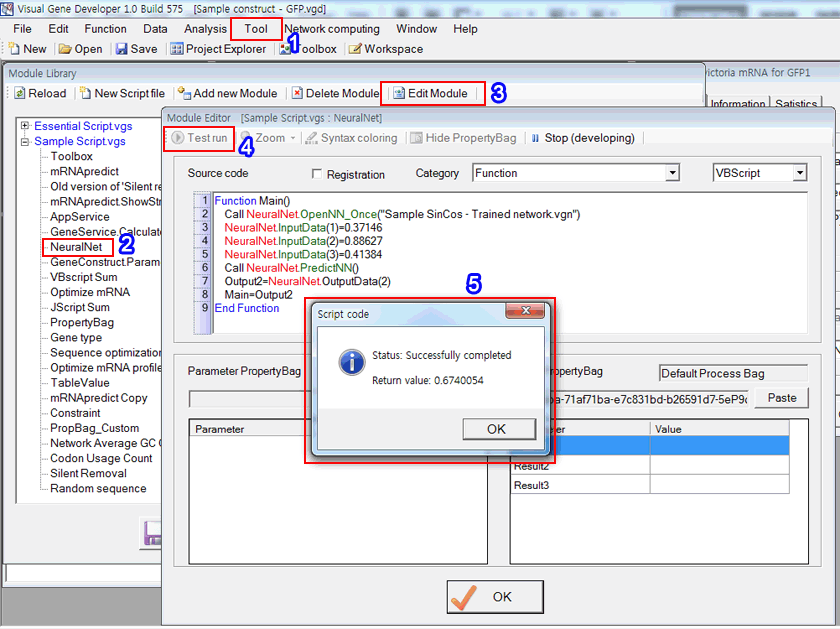
4. Click on the 'Test run' button in the 'Module Editor' window. Check source code and explanation!
Source code
VBScript
[2021] Download- Jam Packed Line Tale Yt-hanzzip.7z -8... May 2026
: The game typically follows a 5-day cycle. You must be patient and progress through Day 1, 2, 3, 4, and 5 to reach the end scenes.
This file appears to be a compressed archive containing Jam Packed Line Tale
, an indie game that involves a multi-day storyline. Based on current community discussions, here is a write-up you can use for a download page, forum post, or video description: Jam Packed Line Tale (YT-HanzZip Edition) Experience the full journey of Jam Packed Line Tale
with this optimized 7z archive. This version is curated for fans looking to dive into the complete narrative arc, covering all five days of the game's progression. Key Features:
Complete Storyline: Follow the tale from Day 1 through Day 5, leading up to the final endgame scenes.
HanzZip Compression: Highly compressed 7z format for faster downloading and efficient storage. Download- Jam Packed Line Tale YT-HanzZip.7z -8...
Immersive Experience: To get the most out of the game's atmosphere, it is highly recommended to use a headset and mouse. Download Details: File Name: Jam Packed Line Tale YT-HanzZip.7z File Format: .7z (Requires 7-Zip or WinRAR to extract) Genre: Indie / Narrative-driven Gameplay Tips:
Patience is Key: This game is designed to be a slow-burn experience; take your time to explore the narrative nuances.
Day-by-Day Progression: Ensure you complete each day's specific requirements to trigger the final sequence.
Safety Note: Always ensure you are downloading from a trusted source and run a virus scan on any .7z or .exe files before opening them to protect your system.
software. This format is used to bundle multiple files—such as application data, media, or documents—into a single, smaller container to make it easier to share or store. To access the contents, a utility like 7-Zip or WinRAR is required for extraction. 2. Naming Conventions : The game typically follows a 5-day cycle
The string "YT-HanzZip" often suggests that the file was shared via a specific uploader or linked through a video platform. Filenames that include "Jam Packed" or "Line Tale" typically refer to software bundles or fan-made digital media projects. 3. Digital Safety and Security
When encountering links for files with this naming structure, it is important to observe several security practices: Source Verification:
Files hosted on third-party file-sharing sites or linked in video descriptions should be approached with caution. Ensure the source is reputable to avoid downloading malware or unwanted software. Antivirus Scanning:
Before extracting a .7z file from an unknown source, it is recommended to run a security scan on the archive. Content Awareness:
Downloads labeled as "packs" or "collections" from unofficial sources often contain unverified third-party content. and Safe Alternatives
If there is a need for instructions on how to securely manage compressed archives or how to verify the integrity of a downloaded file, those details can be provided.
Methodical Column: Downloading and Handling Jam Packed Line Tale YT-HanzZip.7z Files
Overview
The file named "YT-HanzZip.7z" appears to be a 7-Zip archive, a type of compressed file that can contain various files and folders within it. The description "Jam Packed Line Tale" suggests that this archive might contain a collection of content, possibly related to a story, game, or media series, tightly packed or curated into one file.
Step 1: Understanding the File Format
- .7z files: The .7z file format is a compressed archive format that can contain multiple files and folders. It's commonly used for large files, like jam-packed line tales.
5. If it asks for a password – stop.
- Password-protected archives from unknown sources are often used to bypass antivirus scanning.
Legal and Ethical Concerns
Downloading archives that contain copyrighted YouTube content (unless explicitly allowed by the creator) may violate:
- YouTube’s Terms of Service (downloading videos without permission).
- Copyright laws in your country.
- The original creator’s intellectual property rights.
If “Jam Packed Line Tale” is someone’s original story or performance, downloading it outside official channels denies them credit and revenue.
For Creative Commons / Fan Works:
- Archive.org – search for “audio tale collection” or “fan drama.”
- Itch.io – indie creators sometimes release story archives in
.zipformat.
Common Issues and Solutions
- Corrupted files: If the downloaded file is corrupted, try re-downloading it.
- Extraction errors: If you encounter errors during extraction, try using a different file archiver or re-downloading the file.
Downloading “Jam Packed Line Tale YT-HanzZip.7z” – Risks, Reality, and Safe Alternatives
5. The 'Return message' shows a result. It's the same value as shown in the previous prediction date table.
